
What Hosting Support Can Do for Your MariaDB Database: Recovery, Upgrades, and Portability


Choosing where to host your MariaDB database is about much more than performance, pricing and the resources available. Good operational support, good backup practices, a clear upgrade path and the ability to move your data are just as important, if not more so, particularly when something goes wrong.
As we know, keeping database infrastructure up to date is an important part of that responsibility. ScalaHosting, for example, recently rolled out MariaDB 11.8 LTS across its hosting infrastructure, bringing the latest long-term support capabilities, including optimizer improvements and native vector search, to its customers. This is a practical example of how hosting providers can help make new MariaDB capabilities available to a broader audience.
At the MariaDB Foundation, we feel that open source is also about giving users choice and control over their infrastructure and data. Whether you run MariaDB on your own servers or rely on a hosting provider, understanding what your provider can—and cannot—do is essential.
In this guest post ScalaHosting lays out what they consider to be the key issues to be aware of when it comes to MariaDB hosting support (from disaster recovery and versioning through to data portability). They use a number of real world examples to illustrate the sorts of questions you should be asking any hosting provider prior to handing over your databases to them.
This article is a guest contribution from ScalaHosting, a Gold Sponsor of the MariaDB Foundation. We thank ScalaHosting for supporting the MariaDB ecosystem and sharing its expertise with our community. The views and examples presented in this article are those of the author.
When MariaDB stops answering at 2 a.m., or a migration script damages a table, hosting support stops being an abstract score. What matters then is who on the host’s side can look at the server, which backups exist, how they can be restored, and whether you can take your data elsewhere if the relationship stops working.
This article works through those questions from the database operator’s side: where a host’s responsibility for MariaDB usually ends, what really determines how much data you can lose, how hosts manage MariaDB versions, and how to keep your data portable. ScalaHosting’s SPanel serves as a worked example throughout.
A disclosure before going further: this article comes from ScalaHosting. Where we describe our own platform, we link to the documentation behind each claim and say which plans it applies to.
What Support Ratings Can and Can’t Tell You
G2’s Fall 2026 comparison of six hosting providers rates support from user reviews, in a metric G2 calls Quality of Support. Reviews collected as of August 2, 2026, produced these scores:
Provider | Quality of Support | Responses |
| ScalaHosting | 99% | 433 |
| Cloudways | 92% | 933 |
| InMotion Hosting | 90% | 83 |
| Hosting.com | 88% | 176 |
| Liquid Web | 88% | 86 |
| Hostinger | 86% | 702 |
Source: G2, reviews collected as of August 2, 2026.
Two caveats matter for database teams.
First, Quality of Support reflects reviewers’ general experience with a host’s support across every kind of request, from billing and DNS to WordPress. It doesn’t measure MariaDB expertise, and none of these scores tell you how a host handles a corrupted table or a failed upgrade.
Second, the samples differ in size, from 83 responses for InMotion Hosting to 933 for Cloudways, and scores built on fewer responses move more with each new review. ScalaHosting’s 99% rests on 433.
So use the ratings to build a shortlist. The rest of this article covers what to check before you trust any host, ScalaHosting included, with a production database.
Where the Host’s Job Ends Depends on the Service Model
A MariaDB incident usually spans two layers.
The server layer covers whether the server process is running, whether it has the memory and disk it needs, how it’s configured, and which backups exist.
The application layer covers the queries, the schema, and what your migration scripts do. Hosts own some or all of the server layer. The application layer is almost always yours.
How much of the server layer the host owns depends on the plan. The table below shows the typical split for three common service models in the three areas where expectations most often differ. Providers draw these lines differently, so read it as a list of questions to ask rather than a guarantee.
| Area | Shared hosting | Managed VPS | Self-managed VPS |
| Performance optimization | Host sets server-wide MariaDB settings; you can’t change the server configuration. Query and index work is yours. | Host can usually tune memory, connection limits, and logging for your workload on request. Query and index work is yours. | You own configuration, tuning, and monitoring. |
| Version upgrades and security updates | Host picks the version and the schedule for everyone on the server. | Host typically applies updates and plans major upgrades. Ask about notice periods and testing. | You apply updates and run major upgrades yourself. |
| Backup and recovery | Host-run backups, restored through the control panel or a ticket. Binary logs usually aren’t available to you. | Host-run backups plus support-assisted restores. Binary logs and point-in-time recovery are possible where enabled. | Provider snapshots at most. Database-consistent backups and restores are yours to set up. |
Typical division of MariaDB responsibilities by service model. Check your provider’s terms for the exact split.
On a managed plan, five common problems show where the boundary usually sits:
- The MariaDB service stops. Common causes include an out-of-memory kill or a full disk. A managed host’s team can typically restart the service, review the error log, and look for the cause.
- Clients get “Too many connections” errors. The hosting team can check the connection limit against the server’s memory. If the application leaks connections, the fix belongs in its code.
- The disk fills up. The hosting team can investigate what’s using the space, such as logs, binary logs, or local backups. Bloated application tables, such as sessions or cart data, are yours to prune.
- Queries slow down. The host can help enable the slow query log and rule out CPU or I/O starvation. Adding indexes and rewriting queries is development work and is usually outside the scope of hosting support or billed separately.
- A migration damages or drops data. The web hosting team can restore copies from backup and, where binary logs exist, roll them forward. Deciding which rows to keep is up to you.
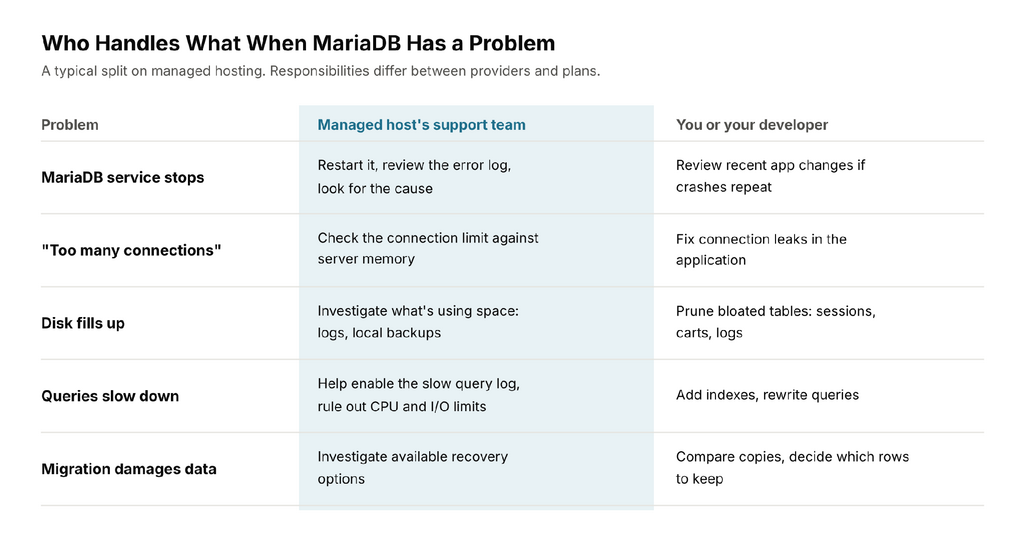
How five common MariaDB problems typically split between a managed host’s support team and your developer.
The last case is where support has the most influence on the outcome, because the result depends almost entirely on which backups exist, how consistent they are, and how they can be restored.
What Actually Determines How Much Data You Can Lose
It’s tempting to read a backup schedule as a promise: daily backups mean you can lose at most a day of data. That only holds if the newest backup is consistent, restorable, and was taken before the problem began.
Two measures make the question precise:
- Recovery point objective (RPO): how much recent data you can afford to lose, measured in time.
- Recovery time objective (RTO): how long the database can be unavailable or degraded while you recover.
With backups alone, your best-case RPO is the time since the last good backup. Real losses can be larger: a backup job may have failed silently, a dump may be inconsistent, or the damage may have started before the last backup and been copied into it. Binary logs change the picture in the other direction. Replayed on top of a backup, they can bring the effective RPO down to the moment before the bad statement ran.
Consistent backups
A backup is only useful if it captures the database at a single point in time.
For InnoDB tables, mariadb-dump –single-transaction takes a consistent logical snapshot without blocking writes, as long as no schema changes run during the dump. Adding –master-data=2 records the binary log position in the dump as a comment, which is the starting point for point-in-time recovery. For larger databases, mariadb-backup takes physical hot backups, which must be prepared before they can be restored. A file-level copy of a running data directory isn’t a safe backup on its own unless it’s coordinated with the database.
Binary logs and point-in-time recovery
The binary log records every change to the data. If binary logging is enabled and the logs are kept back to your last full backup, you can restore that backup and replay changes with mariadb-binlog up to a chosen time or log position, stopping just before the bad migration.
MariaDB documents this as point-in-time recovery.
MariaDB also offers flashback. With binlog_format=ROW and binlog_row_image=FULL, mariadb-binlog –flashback generates the reverse of logged data changes, which can undo a mistaken UPDATE or DELETE without a full restore. It doesn’t reverse schema changes such as DROP TABLE.
Binary logs use disk space and need a retention setting (binlog_expire_logs_seconds) long enough to cover the gap between full backups. On shared hosting, you usually can’t enable or read them. On a VPS, however, you usually can. Ask your host whether binary logging is on by default, how long logs are kept, and whether support will perform a point-in-time restore for you.
Recovery testing
A backup you’ve never restored is a hypothesis.
Schedule test restores into a scratch database: confirm the restore completes, compare row counts on key tables, run CHECK TABLE, and point a staging copy of the application at the result. Time the whole exercise. That number is your realistic RTO, and for multi-gigabyte databases it’s often longer than teams expect.
Delayed Replication
Delayed replication is another good way to avoid losing data and having to restore a backup. This setup requires at least two servers with identical databases. With delayed replication, changes you make to Server 1 are not automatically applied to Server 2. This way, if you make a mistake, you have some time to correct it without affecting your entire setup. You can check MariaDB’s documentation on delayed replication for more information.
At ScalaHosting, you can also take advantage of this configuration in a cluster hosting environment. Upon request, our technical experts can set up your database servers with delayed replication for better redundancy. Delayed replication is enabled using the MASTER_DELAY option to CHANGE MASTER.
Work Example: Recovering a WooCommerce Orders Table
Suppose an extension update runs a database migration at 10:14 that corrupts order data in a WooCommerce store, and someone notices at 10:40. The last full backup ran at 02:00, and orders kept arriving all morning.
Restoring the 02:00 backup over production would wipe out more than eight hours of orders, customer accounts, and stock changes. A safer sequence looks like this:
- Preserve the current state. Take a fresh mariadb-dump of the live database before changing anything. It’s your evidence and your fallback. If the damage is still spreading, put the store into maintenance mode.
- Restore a copy, not over production. Restore the 02:00 backup under a new database name, so the live store keeps running untouched.
- Compare and repair. With High-Performance Order Storage, WooCommerce keeps orders in tables such as wc_orders, wc_orders_meta, and wc_order_addresses (plus your table prefix). Stores on the legacy layout keep them in posts and postmeta. Compare the affected rows between the copy and production, then write back only the damaged rows. Orders placed after 10:14 stay in production.
- Verify and record. Check order totals and stock against payment gateway records, then note how long the recovery took. That’s a measured RTO for the next planning conversation.
Without binary logs, step 3 isn’t possible. The copy reflects 02:00, and the changes made between 02:00 and 10:14 have to be rebuilt from other sources, such as payment gateway records and order emails. That gap is the practical difference between a backup schedule and a recovery plan.
The division of work is usually clear: the host restores the copy and, where binary logs are available, rolls it forward. You or your developer decide which rows go back into production.
MariaDB Version Upgrades and Lifecycle Management
MariaDB publishes a long-term support (LTS) series roughly once a year, alongside quarterly rolling releases. Under the MariaDB Foundation’s current maintenance policy, community binaries for LTS series are released for three years after general availability. Series up to and including 11.4 got five years. Critical and security fixes continue in source releases for two further years.
| LTS series | General availability | Community maintenance until |
| 10.6 | July 2021 | July 2026 (ended) |
| 10.11 | February 2023 | February 2028 |
| 11.4 | May 2024 | May 2029 |
| 11.8 | June 2025 | June 2028 |
| 12.3 | May 2026 | June 2029 |
Community maintenance windows for current and recent MariaDB LTS series, per the MariaDB Foundation’s maintenance policy.
Two practical consequences follow.
A host still running 10.6 is now on a series that no longer receives community releases. And a newer LTS series doesn’t necessarily outlive an older one: 11.4 is maintained almost a year longer than 11.8.
Major upgrades can also change application behavior. MariaDB 11.8, for example, defaults to the utf8mb4 character set with the uca1400_ai_ci collation, which can change how strings sort and compare in tables that never set a collation explicitly.
When you evaluate a host, ask:
- Which MariaDB version runs on my server today, and when will it move to a newer LTS series?
- Are minor releases with security and bug fixes applied automatically, and do they restart the service?
- How much notice comes before a major upgrade, and can I test my application against the new version first, for example on a staging copy?
- Is a backup taken immediately before the upgrade, and is mariadb-upgrade run afterward?
- Can I stay on an older series while my application catches up, and what happens when that series reaches end of life?
ScalaHosting completed the rollout of MariaDB 11.8 across its server infrastructure, following a phased upgrade that began on August 17, 2026. The upgrade was managed by ScalaHosting’s technical team, without requiring customers to perform the database upgrade themselves.
Data Portability: Making Sure You Can Leave
MariaDB’s open-source license means your data format isn’t tied to a vendor, but portability still depends on what your host lets you take with you. A logical dump from mariadb-dump is the most portable format: plain SQL that any compatible server can import. Physical backups from mariadb-backup restore faster, but expect the same MariaDB series and a compatible configuration on the other end.
A few MariaDB-specific checks before a move:
- Version direction. Moving to the same or a newer MariaDB series is routine. Moving to an older one is harder: a dump from a newer server can contain collations or syntax the older one doesn’t recognize. The uca1400 collations, for example, arrived in MariaDB 10.10, so tables that use them won’t import into 10.6 without edits.
- MariaDB to MySQL, or back. The two have diverged. MariaDB stores JSON as text while MySQL uses a binary type, and system tables, authentication plugins, and some SQL syntax differ. Treat a move between them as a migration project, not a restore.
- Users and grants. Database-level dumps don’t include accounts. Export them separately, with SHOW GRANTS or mariadb-dump –system=users.
- Routines and events. Add –routines and –events to the dump. Triggers are included by default.
Database portability also includes replication. Before choosing a hosting provider, ask whether you can replicate your MariaDB database to an external server or receive replicated data from another provider.
This can be useful for migrations, disaster recovery, and avoiding vendor lock-in. Check whether the hosting provider permits such configurations and whether setup and maintenance are included in the service or remain your responsibility.
How ScalaHosting Handles MariaDB Incidents
ScalaHosting’s managed VPS hosting plans include SPanel, a proprietary hosting control panel, along with 24/7 support and free migration of sites, databases, and email. The capabilities below are the ones that matter during a MariaDB incident.
- A watchdog for the service. Every five minutes, SPanel checks whether MariaDB is running, along with the web server, mail, DNS, and each installed PHP-FPM version. It restarts anything that has stopped and logs the event. The check confirms the process is alive, not that it’s answering queries, so a hung server still needs a person to take care of it.
- Automated backups. SPanel takes daily backups of files and databases by default. Customers requiring longer retention can purchase additional backup options covering three, seven, or up to 30 days.
- Restores that leave live data alone. From the Restore Backup tool, a database can be restored over the original, imported into a new database under a different name, or downloaded. Restoring under a new name is what makes the copy-and-compare approach in the WooCommerce example possible without touching production.
- Live query control. On VPS plans, the Database Server Manager in SPanel’s Admin Interface shows currently running queries, lets an administrator stop them, and restarts database services.
Seven Questions to Ask Any Host About MariaDB Support
Whichever provider you’re evaluating, ScalaHosting included, these questions reveal more than any rating:
- Who answers, and when? Check that a technician is available 24/7, and that the overnight team can restart MariaDB and read its error log, not just escalate a ticket to the morning shift.
- What are my realistic RPO and RTO? Ask how often database backups run, how they’re taken, how long they’re kept, whether binary logs are retained, and how long a typical restore takes.
- Can you restore without overwriting? Restoring to a new database name, or to a downloadable dump, lets you compare before you commit to anything.
- Who manages MariaDB versions? Ask which version you’d run, how upgrades are announced and tested, and what happens when a series reaches end of life.
- Can I take my data with me? Check that you can download standard-format dumps at any time, send copies off-site, and leave without export fees.
- How are databases migrated? Ask whether migration is included, whether the host checks the MariaDB versions on both servers, and who verifies the data afterward.
- What happens when frontline support is stuck? Find out whether there’s a path to senior system administrators, and how you’ll get updates while an incident stays open.
What to Put in a Database Support Ticket
The quality of the first message often decides how fast a database incident gets resolved. Before contacting any host, collect these details:
- The time the problem started, with the timezone
- The last time you know the data was correct
- The MariaDB server version, from SELECT VERSION();
- The full error message and its code, such as ERROR 1040
- What changed just before: a migration, a configuration edit, a plugin or application update
- Which databases and tables are affected
- Whether binary logging is enabled, from SELECT @@log_bin;, if you may need a point-in-time restore
With those details, an engineer can go straight to the right log lines and the right backup instead of spending the first round of replies collecting basics.
Conclusion
Choosing a hosting provider for MariaDB is about more than support availability. Reliable backups, recovery options, database version management, and clear responsibilities all matter when something goes wrong.
Data portability is equally important. Customers should be able to understand how to export their databases, and whether replication to or from another hosting provider is permitted. These options help businesses maintain control over their data without unnecessary vendor lock-in.
Quick Answers
Does a high G2 support score mean a host can fix my database?
No. G2’s Quality of Support reflects reviewers’ general experience with a host’s support across all kinds of requests. It doesn’t measure MariaDB expertise or describe what support covers, so ask about database access, backups, restores, and upgrades directly.
Will hosting support optimize my slow queries?
It depends on the plan, but usually not. Support can confirm whether the server is the bottleneck, tune server settings on managed plans, and help you capture slow queries. Rewriting queries and changing indexes is application work.
Do daily backups mean I can lose at most a day of data?
Only if the latest backup is consistent and predates the problem. Binary logs and point-in-time recovery can shrink the loss to seconds, while a failed or inconsistent backup can make it much larger. Regular test restores tell you which situation you’re in.
Can I move my MariaDB database to another host?
Yes, as long as you can export it. A logical dump moves cleanly to the same or a newer MariaDB version. Moving to an older version or to MySQL takes more work.
Reliable database hosting isn’t just about keeping your MariaDB running. It’s about being prepared when things go wrong, knowing how to recover, staying on a supported version and having control over your data.
As this guest post from ScalaHosting makes clear, these are all issues that are very much worth bearing in mind no matter which hosting provider you go with.
For the MariaDB Foundation, openness, choice and continuity are fundamental. The open source nature of MariaDB gives the user the freedom to choose how and where they deploy their database. Making the right decisions around where you host your database, how you back it up, how you do your upgrades and how you ensure portability is what ultimately enables that freedom to be of any real value.
We are grateful to ScalaHosting for sharing what goes into running MariaDB for its customers. We’d like to hear from other MariaDB hosting providers, too. If you have a major upgrade, a recovery exercise or a customer migration that others could learn from, get in touch with the MariaDB Foundation. We’d like to share more of that operational experience with the MariaDB community.
Leave a Reply