
Deploying MariaDB and WordPress on Kamatera

When deploying MariaDB in the cloud, controlling the infrastructure can be as important as controlling the database itself.
Plenty of cloud providers offer their own approaches to virtual machines, networking, storage, and managed services. One of them is Kamatera, a global cloud infrastructure provider that recently joined the MariaDB Foundation as a Silver Sponsor.
Kamatera (see in ecohub) offers customizable cloud servers across more than 20 data center locations worldwide. Instead of choosing from a limited set of predefined VM sizes, you can select the CPU, memory, and storage resources you need. You can also configure private networks, choose where your workloads run, and optionally add managed services and backups.
For MariaDB users, this offers some interesting possibilities. You can deploy a small instance for testing, run a database alongside your application, or dedicate a separate server to MariaDB while keeping complete control over its configuration.
Because Kamatera provides a Terraform-compatible provider, we can automate all of this with OpenTofu.
OpenTofu is an open-source infrastructure as code (IaC) tool managed by the Linux Foundation that lets you declaratively define, provision, and manage cloud and on-premises resources.
So, let’s give it a try!
For this experiment, we’ll deploy a classic WordPress stack with Apache, PHP, and MariaDB Server on Kamatera. But instead of building a single, fixed architecture, we’ll make things a little more interesting.
With the same OpenTofu configuration, we’ll be able to choose between running everything on a single VM or deploying MariaDB on a dedicated server connected through a private network.
We’ll also explore how to enable Kamatera’s optional managed services and backups, all while keeping the deployment automated with a single tofu apply.
Let’s see how it works!
What are we deploying?
The goal is to deploy a complete LAMP-based WordPress environment:
- Linux: Ubuntu 24.04 LTS
- Apache HTTP Server
- MariaDB Server
- PHP
- WordPress
Everything is managed using OpenTofu and Kamatera’s Terraform-compatible provider.
I wanted two possible architectures.
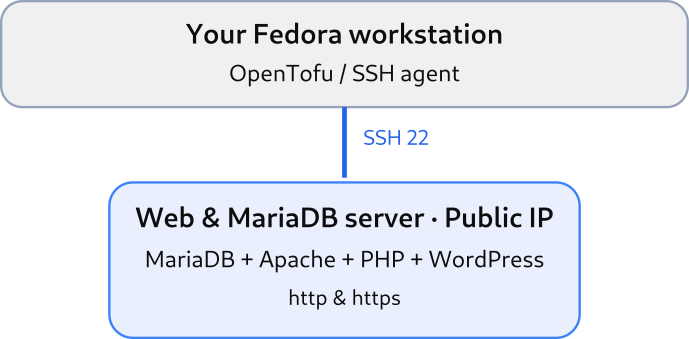
Option 1: Everything on one VM
This is the simplest configuration.
Apache, PHP, WordPress and MariaDB all run on the same server.
WordPress connects to MariaDB using localhost, and no database connection needs to be exposed over the network.
For a first test setup, it’s probably all you need.
Option 2: A dedicated MariaDB server
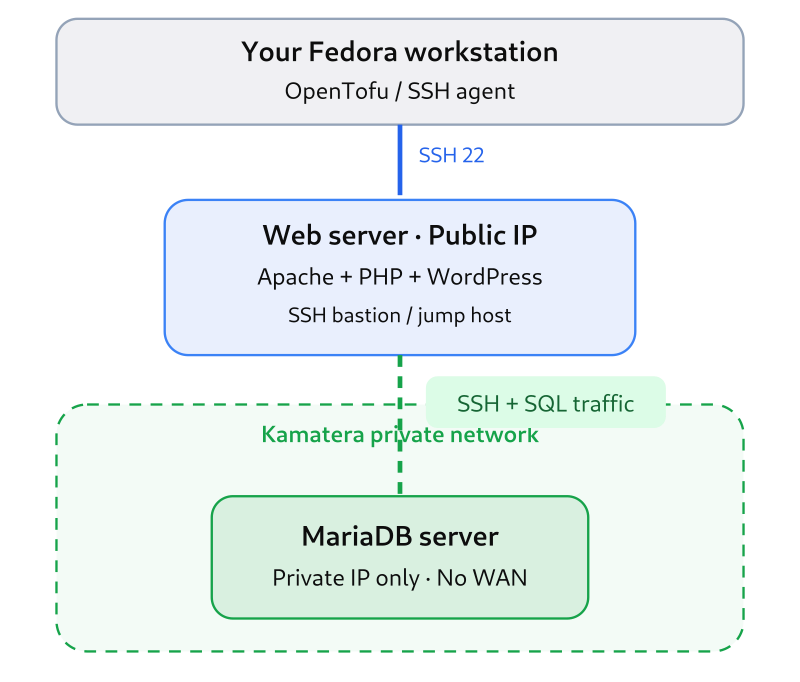
For the second configuration, OpenTofu deploys two VMs:
- A public-facing web server running Apache, PHP and WordPress.
- A separate server running MariaDB.
Both servers are connected through a Kamatera private network.
In my example, the web server uses 10.77.40.10, while MariaDB listens on 10.77.40.11.
WordPress communicates with MariaDB exclusively through that private network.
One important detail: during my tests, Kamatera’s API required a WAN interface when creating the database VM. So the MariaDB VM also receives a public IP, but its firewall restricts incoming connections, and MariaDB listens only on its private address.
This is not quite the private-only VM I initially wanted, but it achieves the important application-level objective: MariaDB is not accessible directly from the public internet once the firewall configuration is applied.
Installing OpenTofu
On my Fedora workstation, OpenTofu was already installed:
$ tofu --version
OpenTofu v1.13.2
on linux_amd64
If you don’t have it, the OpenTofu installation documentation provides instructions for most operating systems.
Next, we need the Kamatera provider.
The project declares the provider in its OpenTofu configuration, so running:
tofu initdownloads the necessary provider automatically.
Of course, you also need a Kamatera account and API credentials.
Kamatera provides a 30-day free trial and this is what I use for this demo.
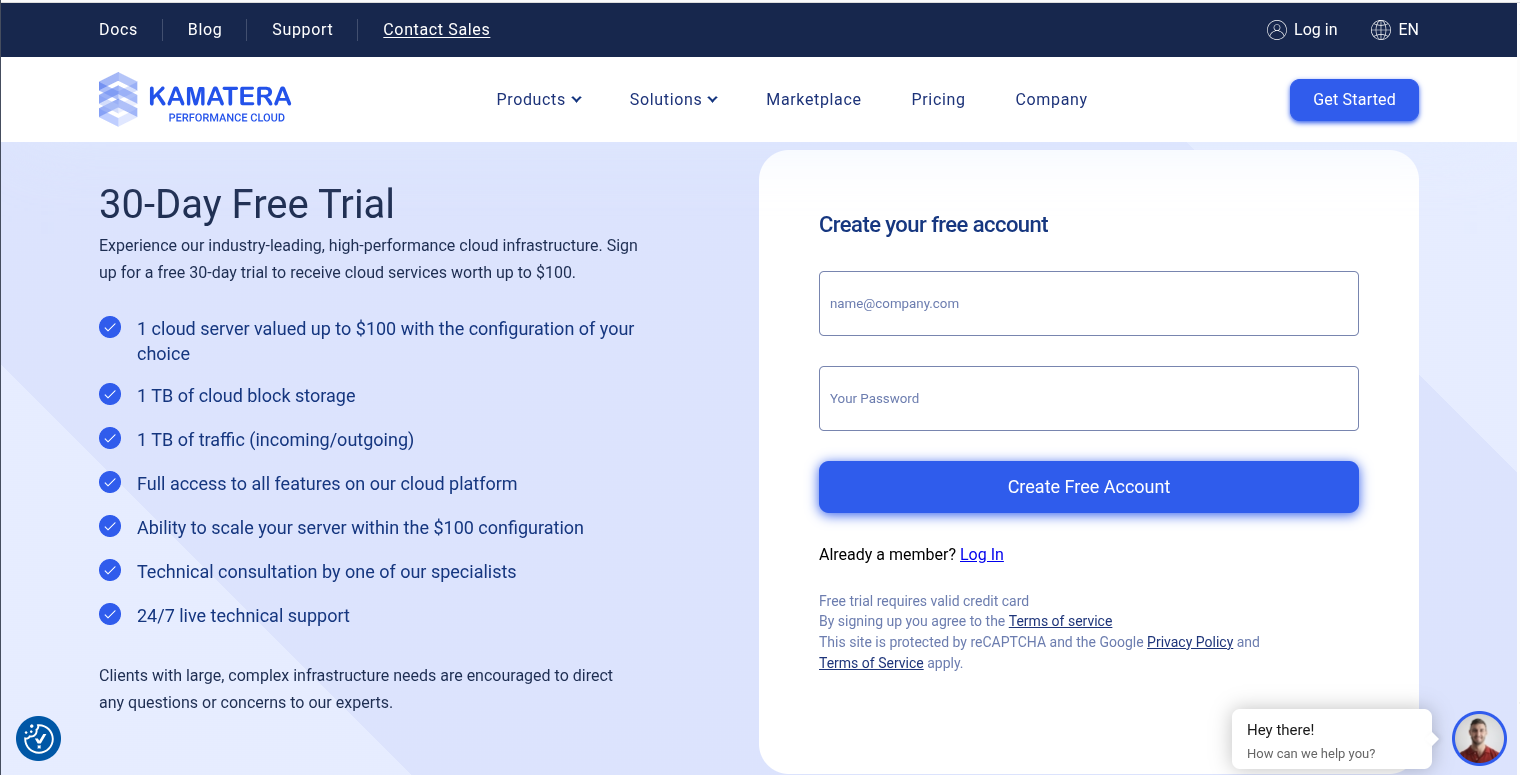
You need to create an API key to use with OpenTofu:
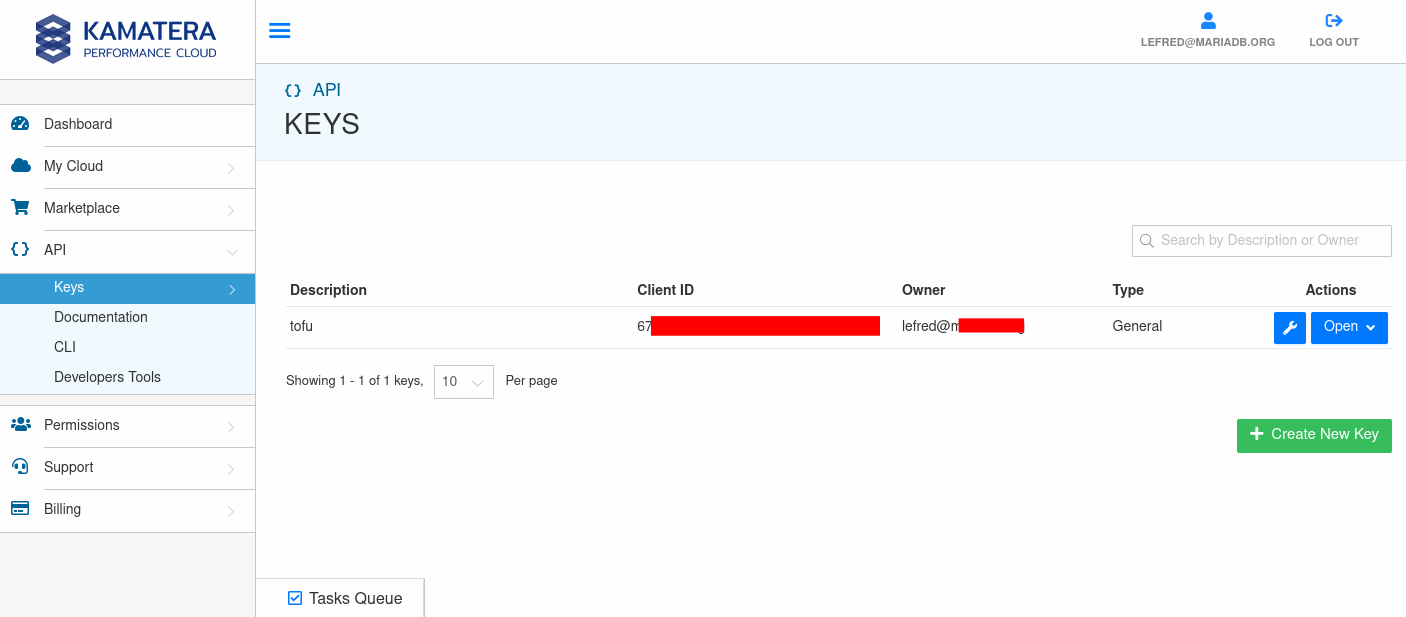
I use environment variables rather than putting API secrets directly into my .tf files:
export KAMATERA_API_CLIENT_ID="..."
export KAMATERA_API_SECRET="..."
Please don’t commit those credentials to Git!
Configuring MariaDB and WordPress with OpenTofu
The interesting part is that you can select the architecture using one variable.
For a single server:
split_database = falseFor a dedicated MariaDB server:
split_database = trueThat’s it!
Well, almost.
I also made the VM resources configurable:
web_cpu_cores = 1
web_ram_mb    = 2048
web_disk_gb   = 20

db_cpu_cores = 1
db_ram_mb    = 2048
db_disk_gb   = 20
Nothing spectacular here. These are demo-sized instances, not recommendations for production WordPress deployments.
One additional configuration detail concerns network traffic packages.
For my selected Kamatera datacenter, EU-FRin Germany, the supported packages included t5000 and b50.
I selected:
monthly_traffic_package = "t5000"This represents the 5 TB monthly traffic package. It doesn’t mean my little WordPress demo is going to consume 5 TB!
If you don’t know which traffic packages are available in the region you wanna use, you can query the API like this:
$ curl -sS \
  'https://console.kamatera.com/service/server' \
  -H "AuthClientId: $KAMATERA_API_CLIENT_ID" \
  -H "AuthSecret: $KAMATERA_API_SECRET" \
  -H "Accept: application/json" \
  -H "Content-Type: application/json" \
  | jq '.traffic["EU-FR"]'

[
  {
    "id": 53,
    "info": "50Mbit/Sec, Unmetered",
    "name": "b50"
  },
  {
    "id": 52,
    "info": "5000GB of traffic",
    "name": "t5000"
  }
]
Just for info, if you are looking for the datacenter code of your choice, you can again query the Kamatera API like this:
$ curl -sS 'https://console.kamatera.com/service/server' -H "AuthClientId: $KAMATERA_API_CLIENT_ID" -H "AuthSecret: $KAMATERA_API_SECRET" -H "Accept: application/json" | jq '.datacenters'Connecting WordPress to MariaDB
When both components share the same machine, WordPress connects locally.
But with a separate database server, the configuration must use the private IP:
define('DB_HOST', '10.77.40.11');On the MariaDB side, the server listens on its private network interface:
[mariadb]
bind-address = 10.77.40.11
The firewall permits TCP port 3306 only from the web server’s private IP.
We also create a dedicated database and user for WordPress. There is no reason to let WordPress connect as root.
This is a fairly standard configuration, but having OpenTofu orchestrate both machines makes it convenient to reproduce.
One ‘tofu apply’ to rule them all
My initial approach was to install the entire software stack using Kamatera’s startup_script feature.
It looked promising.
Unfortunately, my first attempt failed with:
init policy was not completed successfulyAfter some investigation, I discovered that Kamatera executes the startup script during its own initialization sequence.
So I changed the approach.
OpenTofu now handles infrastructure provisioning first. Once the VMs are running, it installs and configures the software using its built-in file and remote-exec provisioners.
The orchestration uses terraform_data resources.
The important point is that there is still only one deployment command:
tofu applyNo separate installation command is required.
For the split-server architecture, the database is configured before the WordPress setup is completed.
And rather than connecting directly to the MariaDB VM over its public interface, the provisioner uses the web server as an SSH bastion:
connection {
  type = "ssh"

  host = var.db_private_ip
  user = "root"

  bastion_host = kamatera_server.web.public_ips[0]
  bastion_user = "root"

  agent   = true
  timeout = "10m"
}
I use my local SSH agent, so OpenTofu doesn’t need to read an unencrypted private key file.
This is a useful arrangement for a demo: the deployment still works remotely, while administration of the database happens through the private network.
What about Managed Cloud Services?
Another interesting option offered by Kamatera is Managed Cloud Services.
The provider includes two attributes:
managed      = true
daily_backup = true
I made them configurable specifically for the database VM:
managed_database      = true
database_daily_backup = true
This enables the corresponding Kamatera server-management and backup options.
However, an important distinction needs to be made.
A managed VM is not necessarily a fully managed MariaDB DBaaS offering.
Enabling Kamatera Managed Cloud Services does not automatically mean you get database-specific patching, automated MariaDB upgrades, Galera clustering, point-in-time recovery or automatic failover.
The exact MariaDB administration responsibilities depend on the managed-service agreement.
Similarly, daily VM backups should not automatically be considered equivalent to application-consistent MariaDB backups.
Still, it’s nice to be able to enable these infrastructure services directly from OpenTofu.
For a disposable demo, I’ll usually keep them disabled to avoid unnecessary costs.
Deploying the environment
After configuring terraform.tfvars, we initialize the project:
tofu initNext, we check the configuration:
tofu validateAnd inspect the proposed infrastructure:
tofu planThis step is particularly important when changing an existing deployment.
Once the plan looks correct:
tofu applyOpenTofu creates the required Kamatera resources and executes the provisioning steps.
After successful installation, WordPress is accessible through the public IP of the web VM.
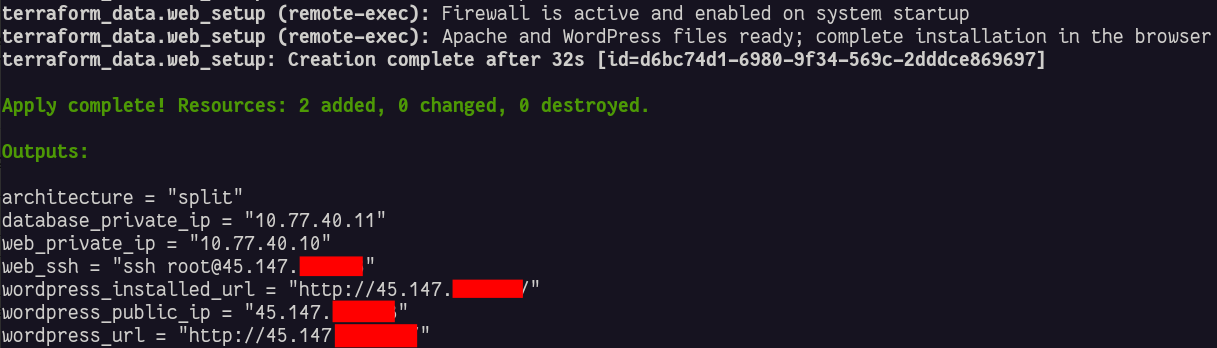
The just-deployed architecture looks like this now:
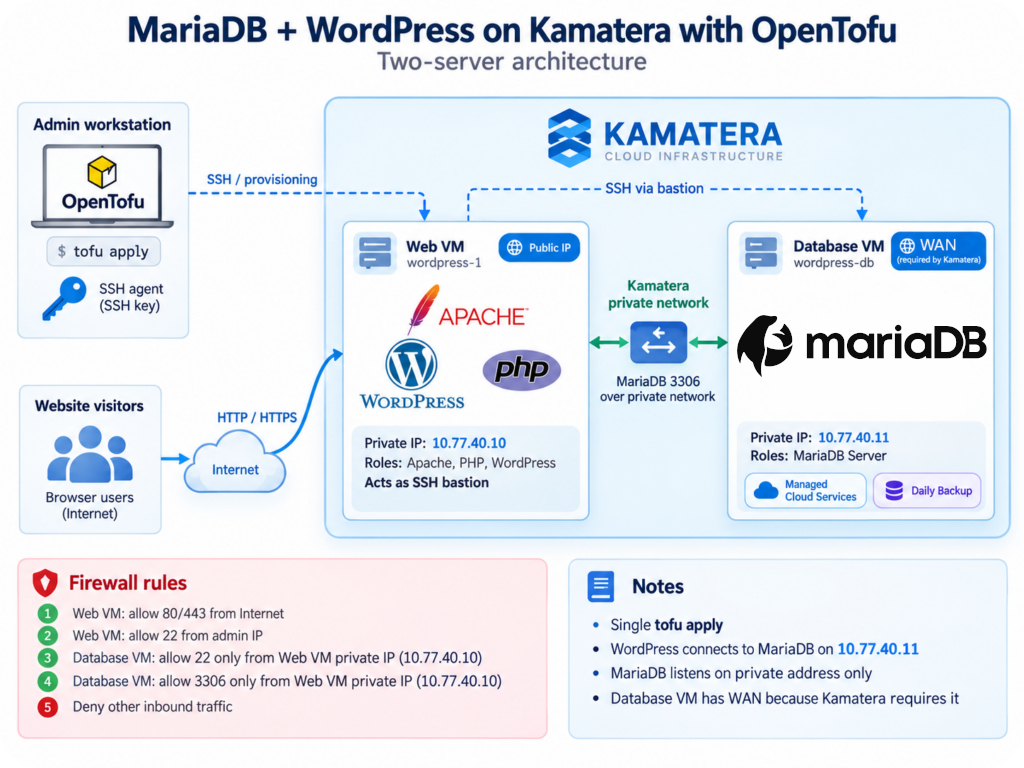
The remaining WordPress installation wizard can be completed in the browser.
Cleaning up
One of the things I appreciate most about Infrastructure as Code is how easily an experimental environment can be removed.
When the demo is finished:
tofu destroyOf course, this removes the infrastructure and its data, so don’t do this with anything you want to keep!
Let OpenTofu manage the lifecycle of the resources it created.
Conclusion
I started this experiment wanting a simple WordPress and MariaDB deployment on Kamatera.
I ended up with something a little more interesting: a configurable OpenTofu project that supports both a single-server deployment and a dedicated MariaDB architecture.
What I particularly like about this cloud provider is that I keep the database under my control. I can change its configuration, experiment with different MariaDB versions, install plugins, enable additional instrumentation or simply destroy the entire environment when I’m finished.
And with Kamatera’s provider and OpenTofu, the whole infrastructure can be expressed as code.
The project is intended as a learning and demonstration environment, not a production-ready WordPress reference architecture. Production deployments would need additional attention to HTTPS, secret management, backups, firewall rules, monitoring and lifecycle management.
The OpenTofu code is available here:
https://github.com/lefred/kamatera-mariadb-wordpress
If you experiment with it, feedback and improvements are welcome!
Happy deploying, and enjoy MariaDB!
Leave a Reply